Concurrent VME controllers: Difference between revisions
Jump to navigation
Jump to search
No edit summary |
No edit summary |
||
| Line 1: | Line 1: | ||
'''Concurrent Technologies VP-E2x''' | '''Concurrent Technologies VP-E2x''' | ||
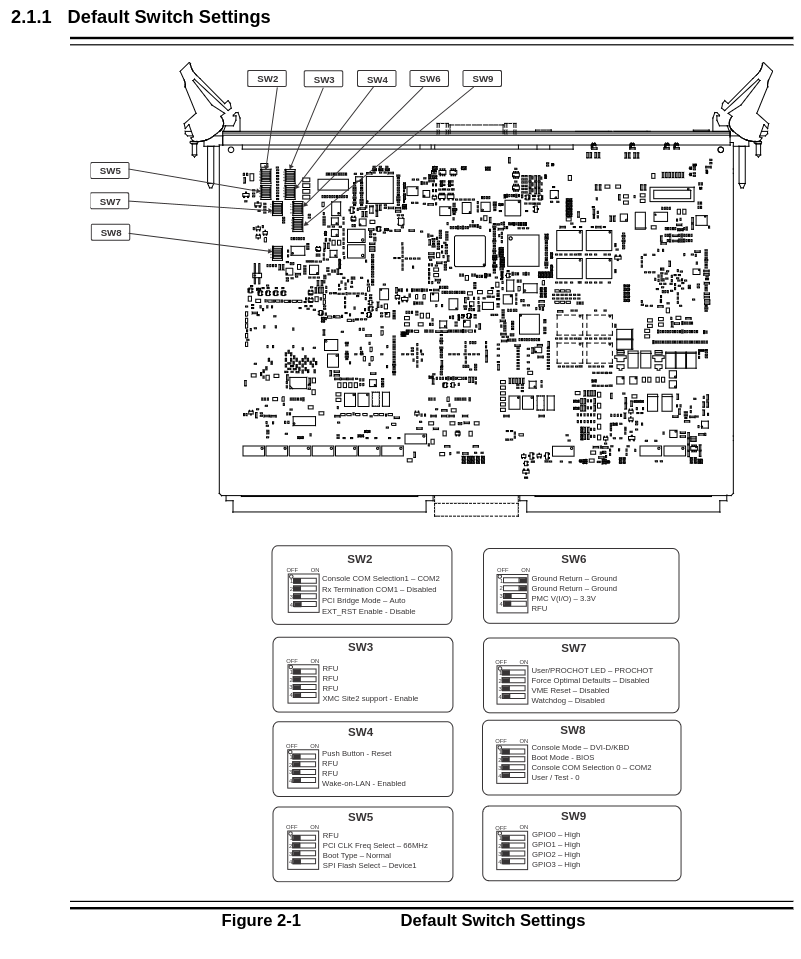
''NOTE:'' if BIOS is hunged or not accessable, load the BIOS with the "optimal defaults" by setting switch [https://clonwiki0.jlab.org/wiki/clondocs/Docs/vp_e2x_msd_switches.png SW7-2] | ''NOTE:'' if BIOS is hunged or not accessable, load the BIOS with the "optimal defaults" by setting switch [https://clonwiki0.jlab.org/wiki/clondocs/Docs/vp_e2x_msd_switches.png SW7-2] to the ON position. Save changes as "custom defaults" and put switch into previous position. | ||
Bios setup for VP-E2x | Bios setup for VP-E2x | ||
Latest revision as of 14:17, 2 December 2025
Concurrent Technologies VP-E2x
NOTE: if BIOS is hunged or not accessable, load the BIOS with the "optimal defaults" by setting switch SW7-2 to the ON position. Save changes as "custom defaults" and put switch into previous position.
Bios setup for VP-E2x
In the BIOS (F2 as it boots):
   Main -> Boot Features ->
       Auto-retry On Boot Fail : Enabled
       PXE Boot : Enabled
       Front Panel ETH A : Enabled
   Advanced -> Miscellaneous Configuration
       PCI MMIO Size : <1.25 GB>
   VME ->
       Outbound Reserved Size : <256 MB>
       Inbound Reserved Size : <16MB>
   Exit ->
       Exit Saving Changes
F2 again for BIOS
   Boot ->
       Boot Type : Legacy Boot Type
       Legacy ->
           Normal Boot Menu : Advanced
           IBA GE Slot 0103 v1594 (should be listed below "Normal Boot Menu")
       Exit ->
           Exit Saving Changes